

PageProof brings creative approvals directly into Jira


The PageProof app bring creative approvals to Jira.
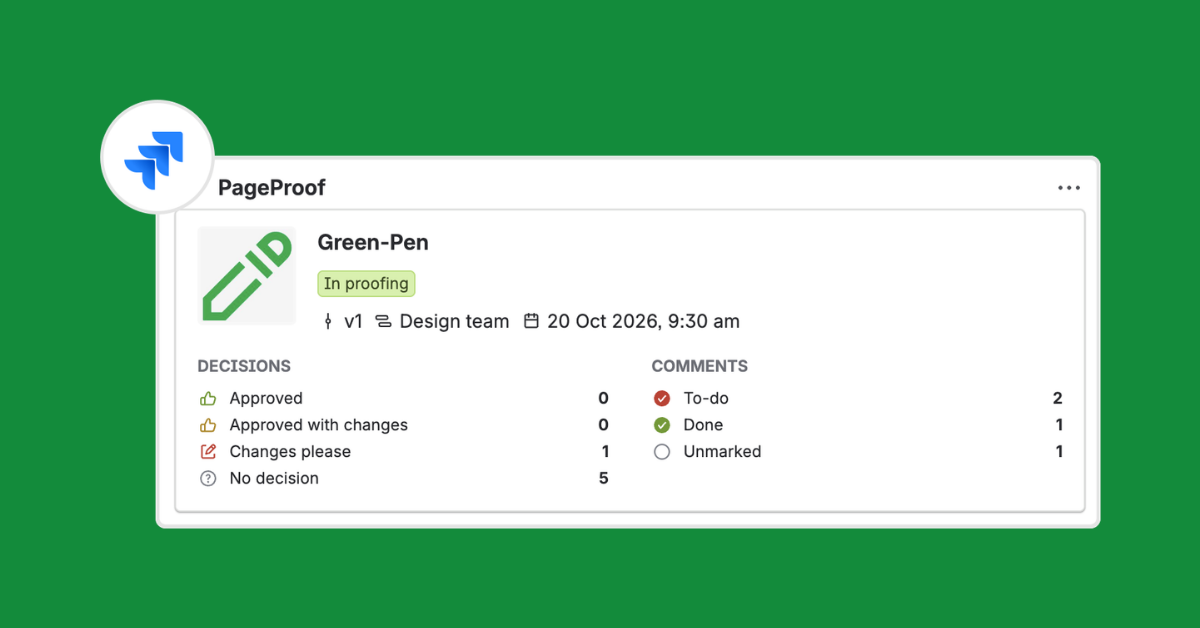
The live proof summary displayed directly on a Jira issue.
The PageProof app for Jira lets teams create proofs from Jira issue attachments, link proofs to related work, and see approval progress next to project tasks.
Creative approvals are crucial to getting work to market, but hard to track alongside project tasks. The PageProof app for Jira brings the two together, keeping approvals visible where work happens.”
AUCKLAND, NEW ZEALAND, October 20, 2026 /EINPresswire.com/ -- PageProof today announced its app for Jira, available to download from the Atlassian Marketplace. The app helps marketing, creative, and production teams bring review and approval into the project workflows they already manage in Jira.— Gemma Rann, CEO, PageProof
Jira helps teams plan and track work, while creative review often happens elsewhere. That can leave project teams chasing updates or manually moving approved files between tools.
With the PageProof app for Jira, users can create a proof directly from an attachment on a Jira issue. The file opens in PageProof, where they can add the review and approval workflow. Teams can also link existing proofs to Jira issues, keeping creative work connected to the task it supports.
A PageProof card on the Jira issue gives teams a view of proof status, version, workflow step and due date, along with comment and to-do counts and reviewer decisions. Team administrators can also enable proof summary comments and automatic upload of the approved file to the Jira issue after final approval.
Key benefits of the PageProof app for Jira:
Create proofs from Jira attachments: Start a proof from an attachment on a Jira issue, then finish setting it up in PageProof.
Keep proofs connected to project work: Link an existing proof to the Jira issue it belongs to.
See approval progress on the issue: View proof status, version, workflow step, due date, comment and to-do counts, and reviewer decisions.
Deliver approved files automatically: Choose to upload the approved file to the Jira issue once the proof receives final approval.
Configure the integration for your team: Team administrators can choose how proof links, summaries, and approved files appear on issues.
“We designed the integration to make the handoff between Jira and PageProof simple. Teams can start a proof from a Jira attachment, see key proof details on the issue, and automatically add the approved file when review is complete.” Marcus Radich, CTO, PageProof.
Learn more about the PageProof integration for Jira and bring creative approvals into your project workflows.
About PageProof
PageProof is the leading online proofing platform for reviewing and approving creative work. It enables teams to securely share any type of file, gather feedback, and manage approvals — all in one place.
With powerful workflow automation, advanced markup tools, and AI-powered capabilities, PageProof helps teams move work forward faster and with greater accuracy.
PageProof integrates with tools including Adobe Creative Cloud, Canva, Figma, Microsoft Office, Asana, monday.com, Airtable, and ClickUp, and delivers exceptional return on investment, as recognized by customer reviews on G2.
Built for enterprise, PageProof offers triple-layer encryption, robust security controls, and scalable infrastructure to support teams worldwide.
Learn more at pageproof.com and follow us on LinkedIn and X.
Julia Schonrock
PageProof
julia@pageproof.com
Legal Disclaimer:
EIN Presswire provides this news content "as is" without warranty of any kind. We do not accept any responsibility or liability for the accuracy, content, images, videos, licenses, completeness, legality, or reliability of the information contained in this article. If you have any complaints or copyright issues related to this article, kindly contact the author above.
